Gradientspace Node Graph
Hi!
Introduction / Background
Houdini, ComfyUI, Weavy, …. Node graphs are everywhere.
UE Blueprints are a different beast. Geometry Scripting, Scriptable Tools.
Download
sdfsa
Gradientspace Graph Editor
dafsd
Gradientspace Graph Engine
The underlying GSNodeGraph libraries and Evaluation Engine, as well as most of the Node Libraries, are completely isolated from the GSGraph Editor, and available as a separate MIT-licensed open source C# project on GitHub (link). This includes save/load of the JSon graph serialization format (.gg files), so the .gg files you create using the GSGraph Editor can be completely loaded and evaluated in your own C# apps.
A command-line graph executor, GSGraphCL, is also included. This means you can use GSNodeEditor to create command-line utilities implemented as .gg node graphs, and then run them from the command line or other scripting languages. A standard library of nodes for accessing command-line arguments and environment variables is included, as well as a substantial Filesystem library which exposes many of the most commonly-used functions from the C# System.IO namespace.
Code Nodes
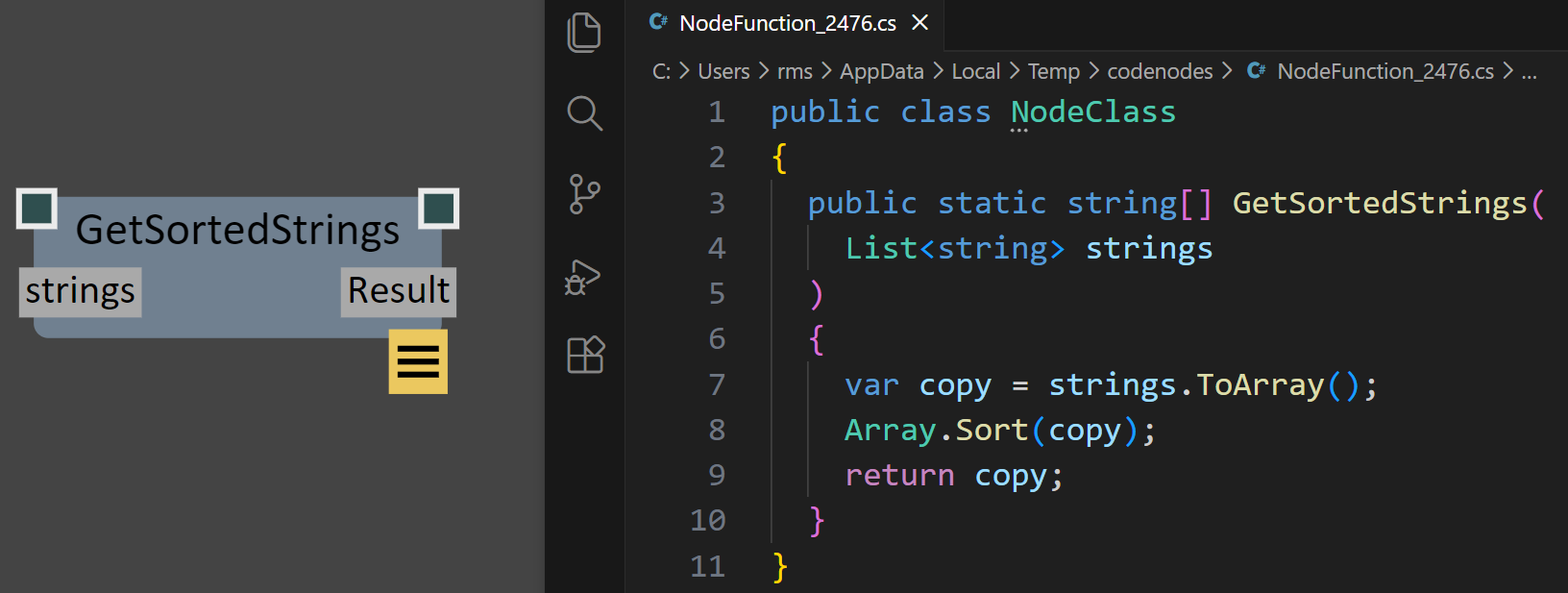
One of the most powerful features of GSNodeGraph is it’s support for Code Nodes, which are custom Graph Nodes that are defined by C# code that is stored as part of the Node and dynamically compiled on-the-fly using the Roslyn, the C# compiler SDK. A simple example is shown to the right, where the C# code for a function called GetSortedStrings is shown on the right, and the resulting Node is shown on the left. As the C# code is edited and saved, the graph node will automatically update.
The text for the C# Code Node is stored internally. When you click on the Edit button (in the bottom-right of the node), this internal code is written to a temporary text file and Visual Studio Code is launched to edit that file. As you save changes, the code will be recompiled and the Node updated. Compile errors will be shown via an Error Widget on the Node.
(GitHub Copilot integrated into VSCode is a great way to create and edit these code functions…)
Code Nodes allow you to leverage C# functionality that isn’t exposed in the standard GSGraph Node libraries. A powerful functional-programming example is shown in the video clip below, where the ProcessMeshVertices function takes a C# Function object, defined as Func<Vector3d,Vector3d,Vector3d>, which is used to transform every individual vertex of a Mesh. A custom CodeNode called NormalDisplaceFunc is created that emits a matching C# Function, defined via a lambda. Combined, this setup allows for arbitrary mesh deformations to be implemented efficiently, without requiring any (slow) loops at the Graph level (something we never figured out how to achieve efficiently in UE Geometry Script). And the Func returned by the code node is real jit-compiled C# code, so the overhead is no larger than if the deformation was written in pure C#.
Multi-Language Support
Although GSNodeGraph is built with C#, the NodeGraph system is flexible enough that it can support other programming languages, as long as they have some level of interoperability with C#. By leveraging the excellent Python.NET open-source project, I have implemented initial support for Nodes implemented in Python, and some Python datatypes. Currently Python is primarily supported via Python Code Nodes, with some basic support for conversion between Python lists and C# Array/Lists, and support for Python tuples.
Python Code Nodes work the same way as C# Code Nodes, where the Python code is stored inside the Node, and edited in VSCode via automatically-managed temporary files. A simple example is shown below.
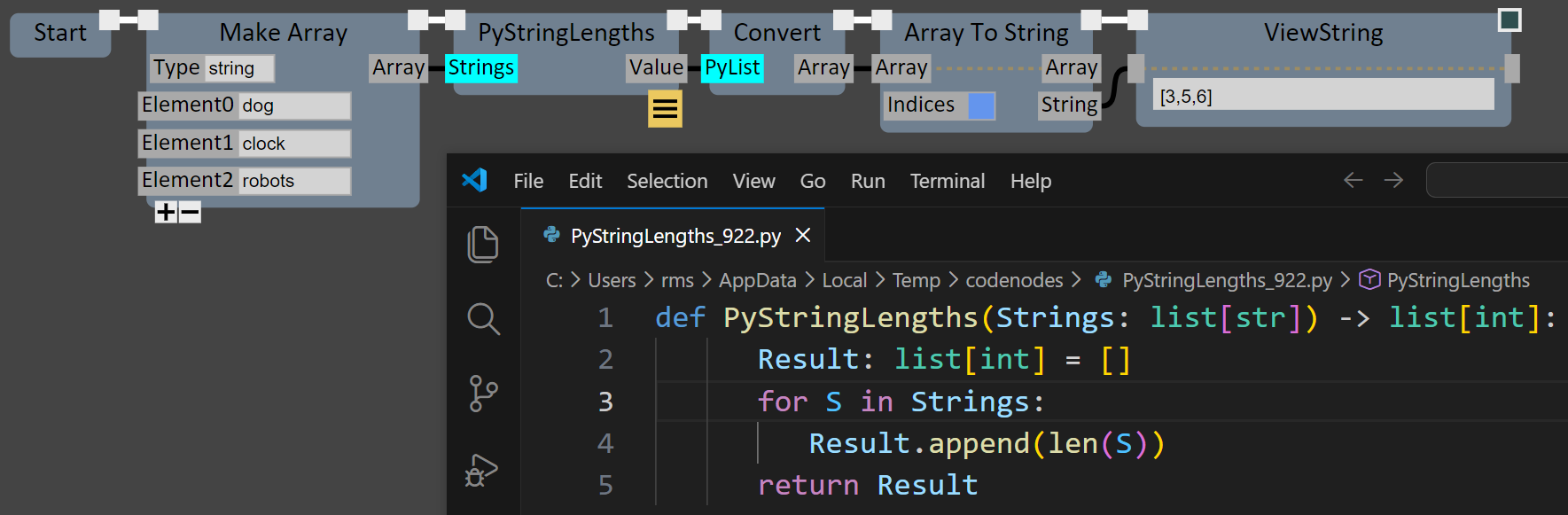
Note the usage of Type Annotations to indicate the Types of arguments and return values in the Python code above. The Type annotations are not strictly necessary - the same graph will execute correctly without them, because Python.NET can handle many Python/C# data conversions automatically via C#’s powerful dynamic programming constructs. Untyped Python data & objects can also be passed directly between Python Code Nodes without any conversion to C# Types. However without explicit Types, many of the Type-based contextual features of the Graph Editor will not be functional.
Support for TypeScript and potentially other languages is being investigated…
Vibe-Coding with Nodes
sadfad
Other Graph Features
GSNodeGraph has been in the works for a while now, and many useful features have been implemented. Keep scrolling to find brief descriptions of the following:
Custom Node Libraries
Type Conversions
Placeholder Nodes
Dynamic Nodes
In/Out Parameters
Variables
Aliases
Graph-Defined Functions
Error Handling
Versioning
Renaming
Gradientspace Graph File Format (.gg)
Custom Node Libraries
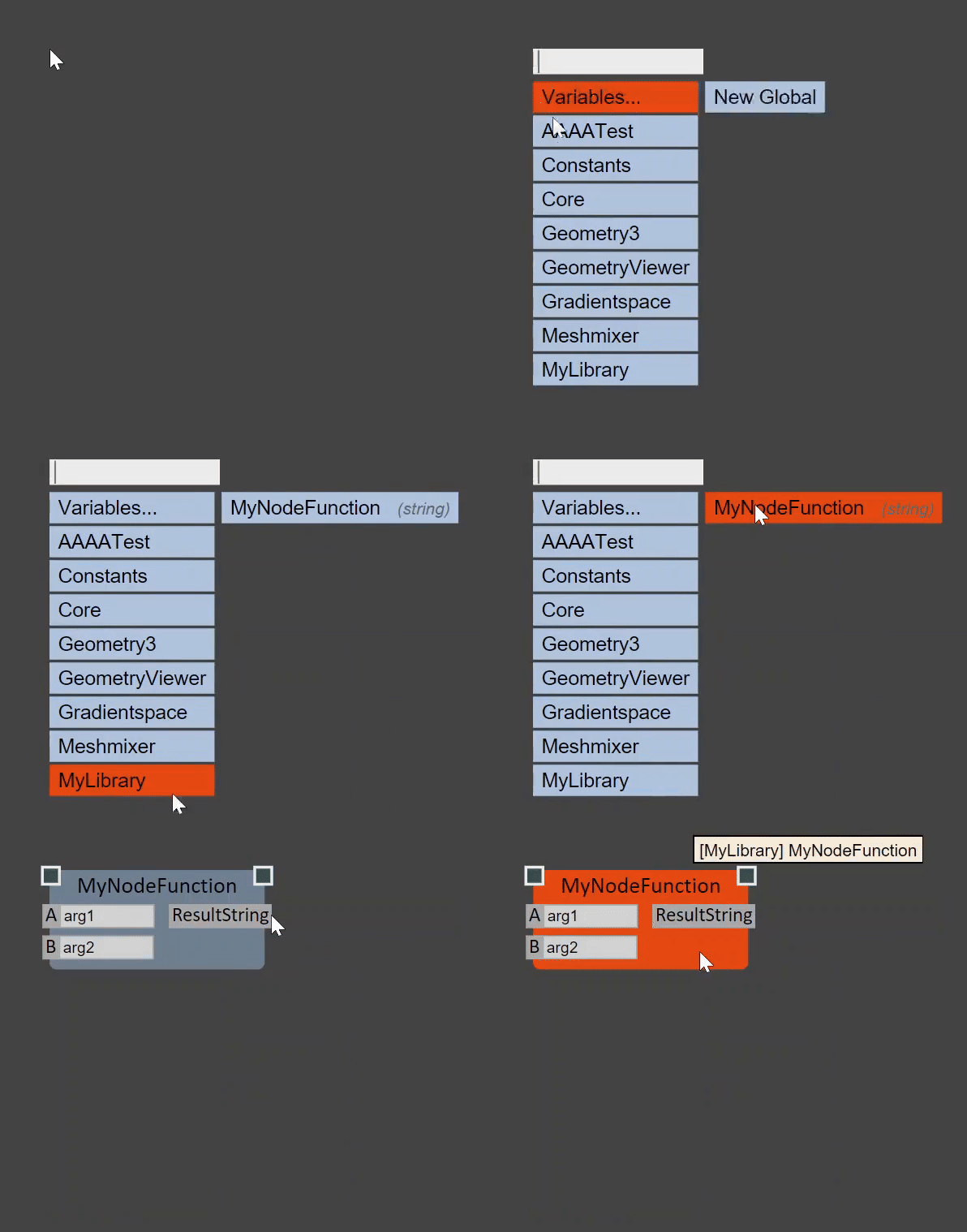
GSGraph supports custom nodes implemented in two ways. The first is to subclass the generic node base-class (NodeBase), or one of the various other parent-node types. The second, and what I think will be much more common, is to simply implement C# static functions and tag them with the [NodeFunction] attribute, like this:
[NodeFunctionLibrary(“MyLibrary”)]
public static class MyNodeLibrary
{
    [NodeFunction(ReturnName="ResultString")]
    public static string MyNodeFunction(string A = "arg1", string B) { … }
}
When the DLL containing this type is loaded, the Graph Engine will automatically scan the public classes for [NodeFunctionLibrary] tags, and [NodeFunction] members, and surface them as Nodes in the Graph Editor. The argument names and default values will automatically be extracted using C# reflection. C# “out” and “ref” parameters will automatically be converted to additional node Output pins. The NodeFunction Attribute has various additional parameters, like the ReturnName shown above, to further customize the Node.
Type Conversions
Converting between data types is one of the small annoyances that can make working with a NodeGraph feel tedious. GSGraph supports simple registration of type-conversion static functions similar to custom nodes - just tag the method with the [GraphDataTypeConversion] Attribute, as shown below-right.

Placeholder Nodes
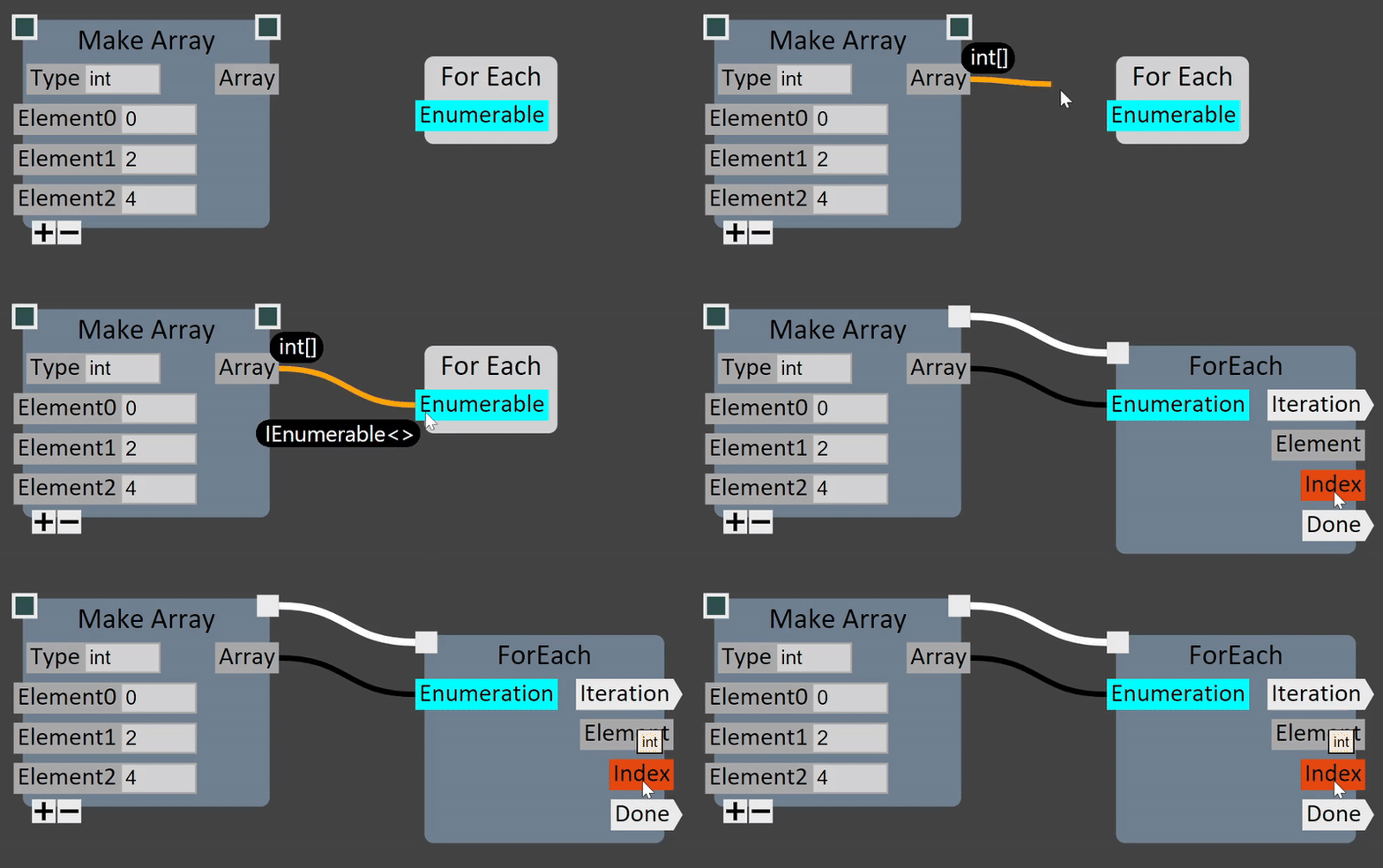
GSGraph supports the concept of “Placeholder” Nodes, which allow the graph to be created without knowing explicit types up-front. This is particularly useful for handling C# generics. In the example on the right, a ForEach placeholder node has been placed. Any type that implements IEnumerable is a valid source for the placeholder’s input pin. Once an int[] output pin is connected, the Placeholder is automatically expanded into an explicit ForEach node that takes an IEnumerable<int> input.
Dynamic Nodes
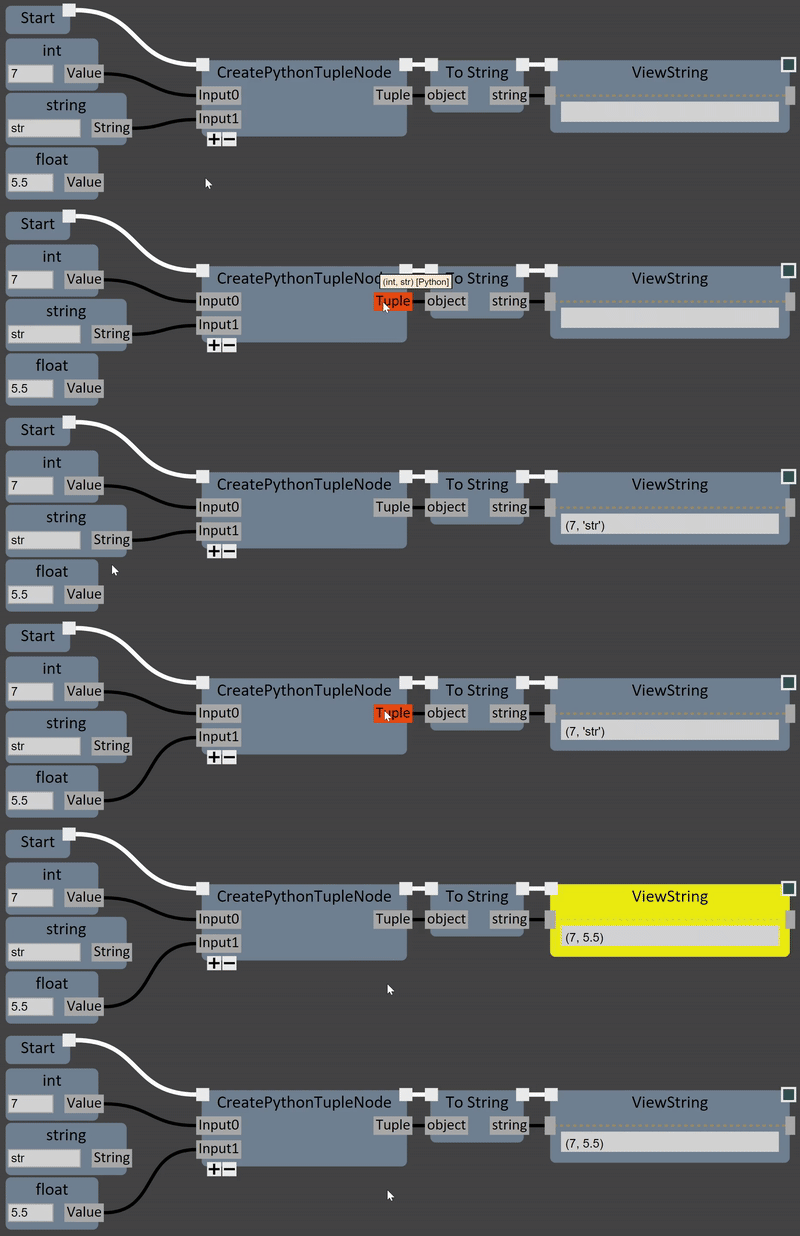
GSGraph also supports the concept of “Dynamic” node outputs, which change type depend on changes to the inputs. This is particularly useful for supporting Python interoperability. In the example below, the CreatePythonTupleNode creates a Python tuple based on the variable-length list of inputs to the Node. The types of the tuple elements are dynamically updated as the input pins (which are of C# type ‘object’) are rewired.
In/Out Parameters
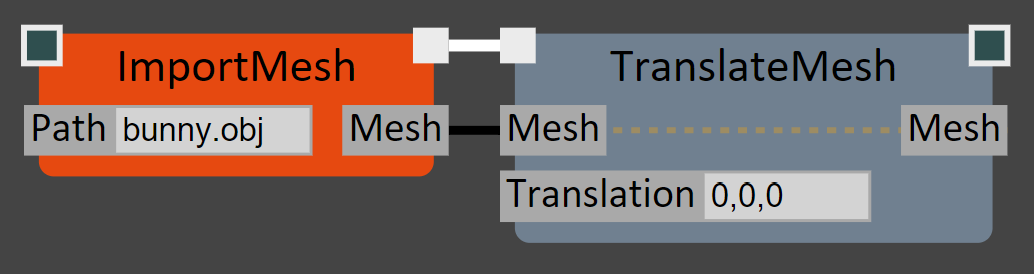
Another annoyance of NodeGraph wiring is when the output of one Node needs to be passed to several others, requiring many increasingly-long wires from the ‘output’ pin to all the downstream nodes. GSGraph supports “InOut” pins, in which the input value is automatically provided as an output. This allows Nodes to be cleanly chained with minimal wire-clutter.
On Nodes defined by static functions, C# “ref” parameters will automatically be exposed as InOut pins. The connection between the input and output pin is visualized with a dashed line in the Node, as shown in the TranslateMesh node above.
Variables
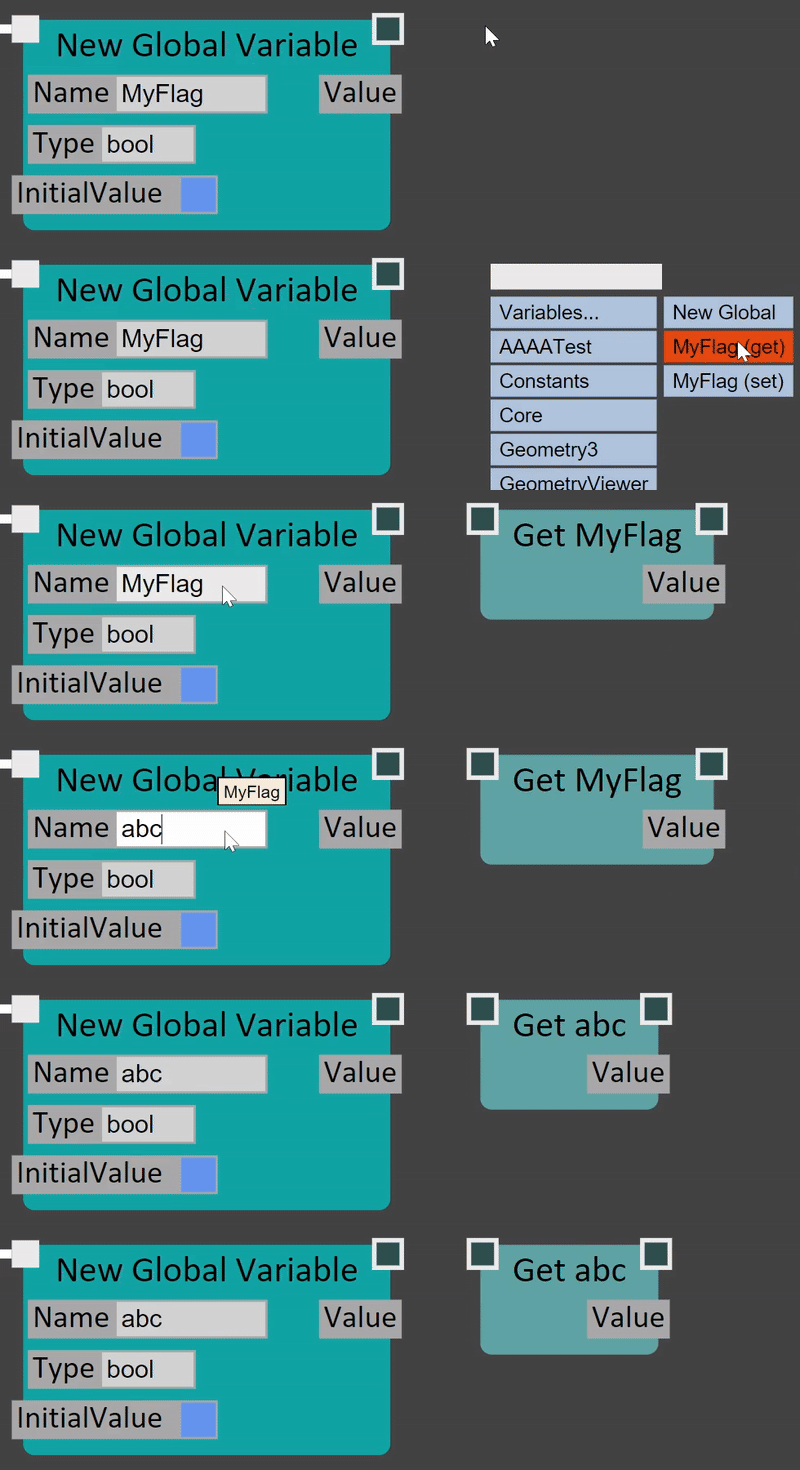
GSGraph supports explicit Variable definitions. A created Variable has a unique name, and a quick shortcut allows any output pin to be automatically wired into a New Global Variable node. Once defined, a variable can be accessed/updated with Get and Set nodes that “know” the name of their source variable, so that if the Name field is updated, all Get/Set nodes are automatically updated as well.
(Local Variables will also be supported in the future)
Aliases
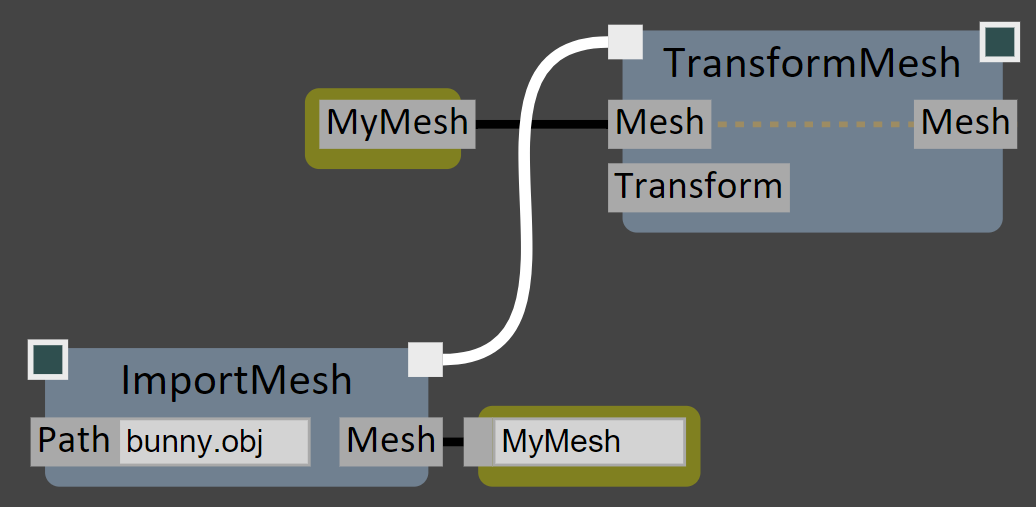
Aliases are also supported. An Alias is similar to a Variable, in that it is defined with a unique name in the graph, and can be accessed via an Accessor node. However unlike a Variable, an Alias does not have explicit storage separate from the output pin it is created from. Instead the Alias acts like a direct wire - evaluating the Accessor simply evaluates the original output pin it was connected to. This allows for cleaner graphs without changing the evaluation semantics.
Graph-Defined Functions
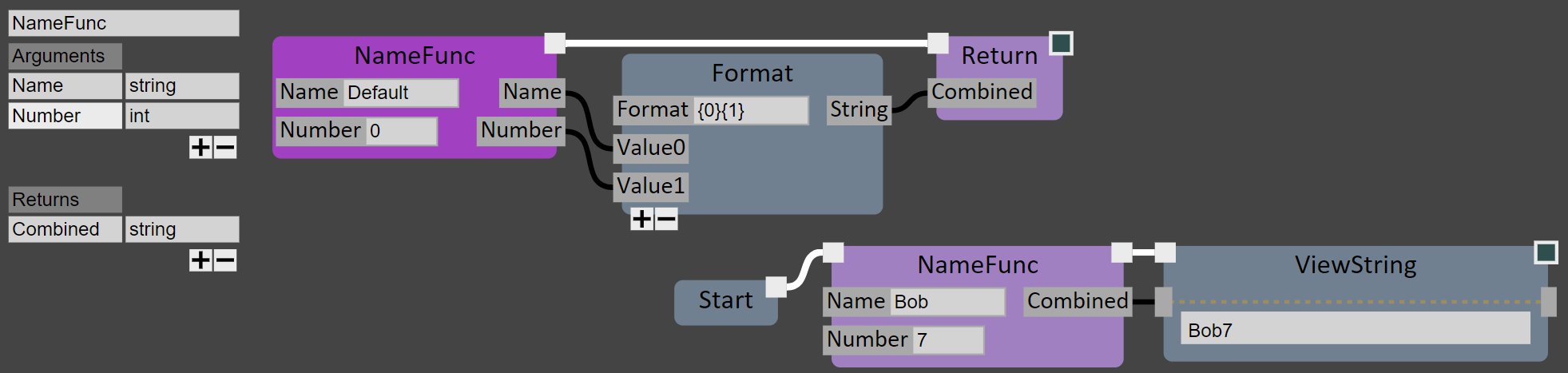
In addition to defining re-usable Nodes using compiled C# or inline CodeNodes, Functions can also be defined in the graph. These are sub-graphs that will be executed whenever they are called. In the example below I’ve defined a simple example function, called NameFunc, that takes string and int parameters, and creates a combined Name+Number string. An in-graph UI panel is used to configure the function, and Return nodes set the output-pin values. A call to NameFunc is shown in the bottom-right.
Error Handling
One of the great strengths of C# in this NodeGraph context is that, as long as the code being called is “managed” (ie C# that doesn’t use unsafe blocks, raw pointers, etc), any failure in a Node can be caught and surfaced to the user. In the example below, the output Mesh of ImportMesh is not connected to the SimplifyToTriangleCount. During evaluation, the node throws an Exception, which is caught and indicated with a red node and a hoverable exclamation-mark widget.

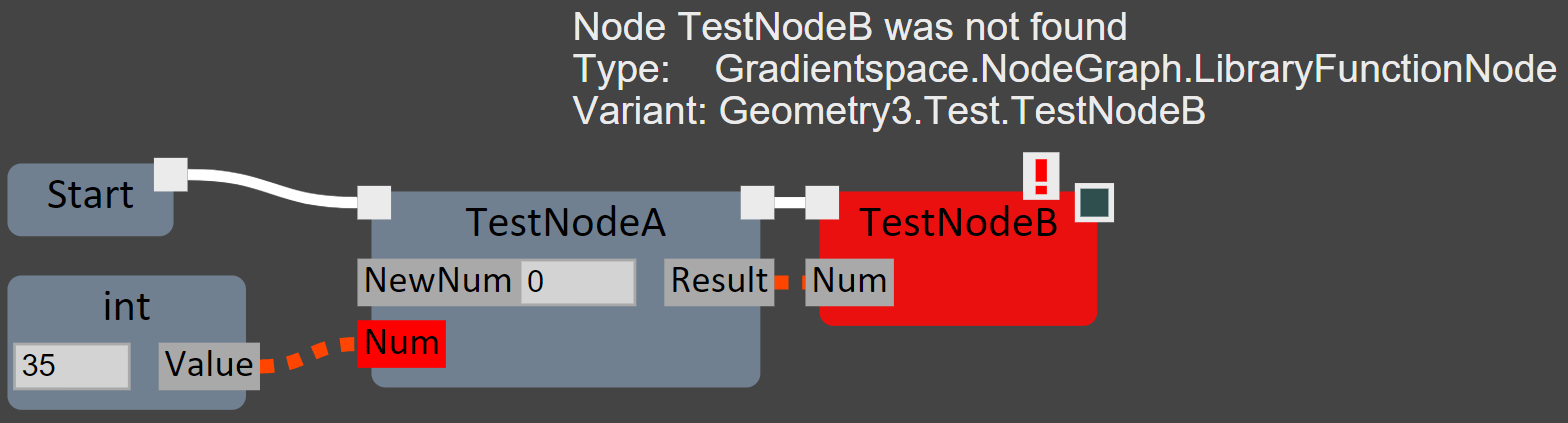
Errors can also occur when trying to load a saved graph if the underlying Node definitions have changed in some way (without proper Version handling - see the next section). In the example below, the file was saved with nodes defined as int TestNodeA(int Num) and TestNodeB(int Num). Then the TestNodeA parameter was renamed to NewNum, and TestNodeB was deleted, and the graph was reloaded. The missing node and missing/invalid data connection both remain in the graph, making it straightforward to identify what is wrong and fix it.
Versioning
A thorny problem in any NodeGraph system is dealing with changes to Nodes, whether to fix bugs and design mistakes, or to improve functionality. In some cases, like exposing an optional parameter with a default value, the existing Node function can simply be updated. But even small changes, like modifying a default parameter, could break existing graphs, and so it’s often necessary to create a new Version of the node function. However it’s also desirable to keep the name of the node consistent, and in particular, have the ‘newest’ version of the node use the original name.
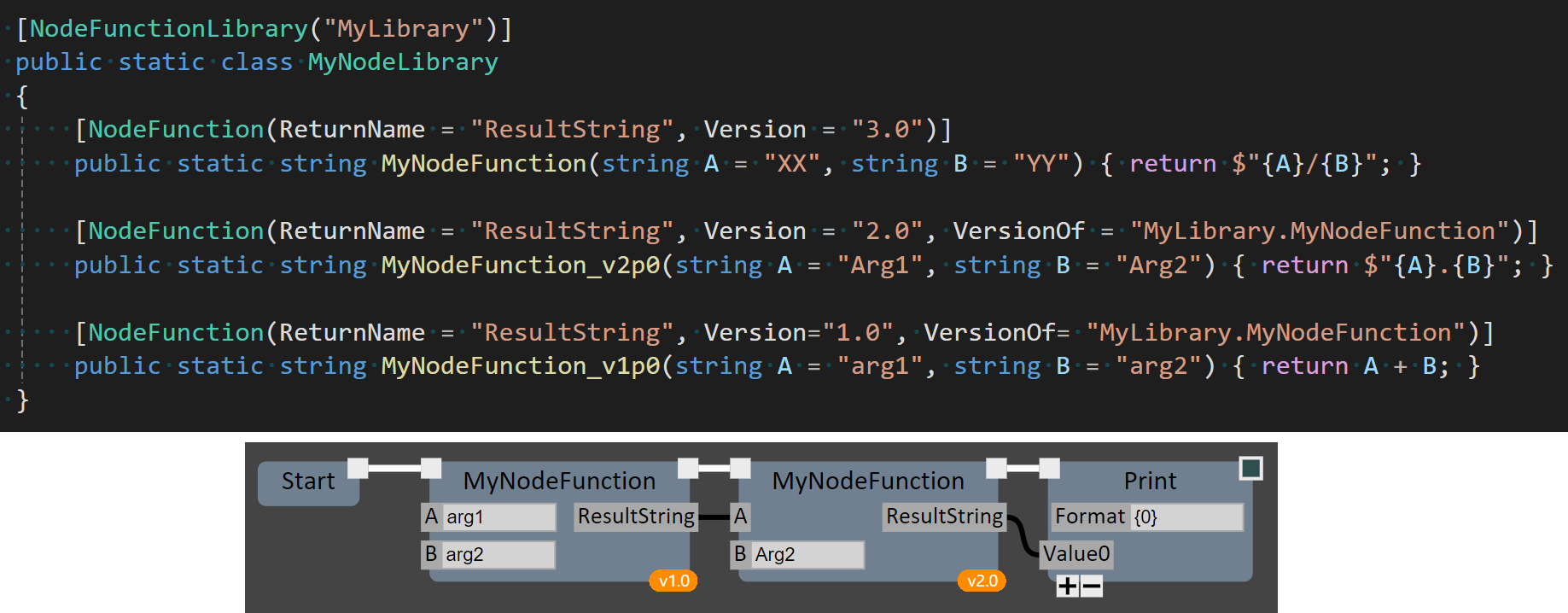
Here’s how I’ve addressed this situation in GSGraph. When a new version of a NodeFunction is introduced, the existing version is renamed, and Version and VersionOf tags are added to the [NodeFunction] attribute. An example is shown below, with 3 versions of the sample MyNodeFunction from above. When a save file is loaded that contains MyNodeFunction but with a non-current version number, the graph loader searches for the old version with the appropriate tags. The Graph Editor indicates old versions using small bubble widgets on the nodes (shown below), but maintains consistency in the node name.
Renaming
Renaming is supported for both [NodeLibrary] and [NodeFunction] tags. Old names can be added using [MappedFunctionLibraryName("OldLibrary")] and [MappedNodeFunctionName("OldLibrary.OldFunction")], respectively. Node Types can be remapped using [MappedNodeTypeName("OldNamespace.OldClassName")]
(Currently node argument remapping is not supported, but expect to see this in the future)
Gradientspace Graph File Format (.gg)
Graphs are stored in standard json, with the file extension .gg. The json structure is very minimalist, with no dependencies on internals of the Graph Engine or Editor, only the C# type and attribute information. This will (ideally) allow external applications to parse and manipulate the graph representation. And with enough training data, it should be possible to have LLMs generate graph nodes/connection JSon.
Partial graph files are also supported — in fact, this is how copy-paste is implemented inside GSGraphEditor!
Node Libraries
The GSNodeGraph Engine includes many different Node Libraries, exposing various C# standard libraries, Python, and core math types and geometry processing from the Gradientspace geometry3Sharp library. Expect to see much more in this direction, along with node libraries for Image processing and Machine Learning.
In addition, a few more domain-specific Node Libraries are in development. These libraries are included with the GSNodeEditor installer, but are not (currently) open-source.
Meshmixer Node Library
SendToMeshmixer
Unreal Engine Interop Library
adsfds