Gradientspace Graph Beta
/Today I am releasing a beta of Gradientspace Graph, my C#-based NodeGraph programming environment. I’ve been developing this system over the past 2 years, largely based on my experience with the Blueprints system in Unreal Engine, and my contributions there (Geometry Script and Scriptable Tool). However, Gradientspace Graph (GSGraph) is not specific to games, procedural geometry, or computer graphics - it is a general-purpose programming system (just like Blueprints sorta is, but moreso). It seems like many coders who have been at it for a while (nearly 30 years, for me) eventually feel compelled to try to do something about Programming itself, and so I guess this is my attempt :)
There is a bunch of information and a Windows installer here: http://gradientspace.com/gsgraph. OSX coming soon. You can find me on Bluesky or the Gradientspace Discord if you want to provide criticism or encouragement (I appreciate both equally!!). The core NodeGraph Engine is MIT open-source (on GitHub), while currently the Editor is closed-source.
NodeGraph programming is obviously not for everyone, and I don’t expect most Text-based programmers to be interested in this project…initially. However although I’m providing a Node-based interface, a major aspect of GSGraph is the integration of Code directly into the Graph, currently in the form of “Code Nodes”. Two simple examples are shown below - a C# Code Node and Python Code Node. Because yes, this Node Graph works with Python, too. (Ideally type-annotated Python, but it’s not strictly necessary).
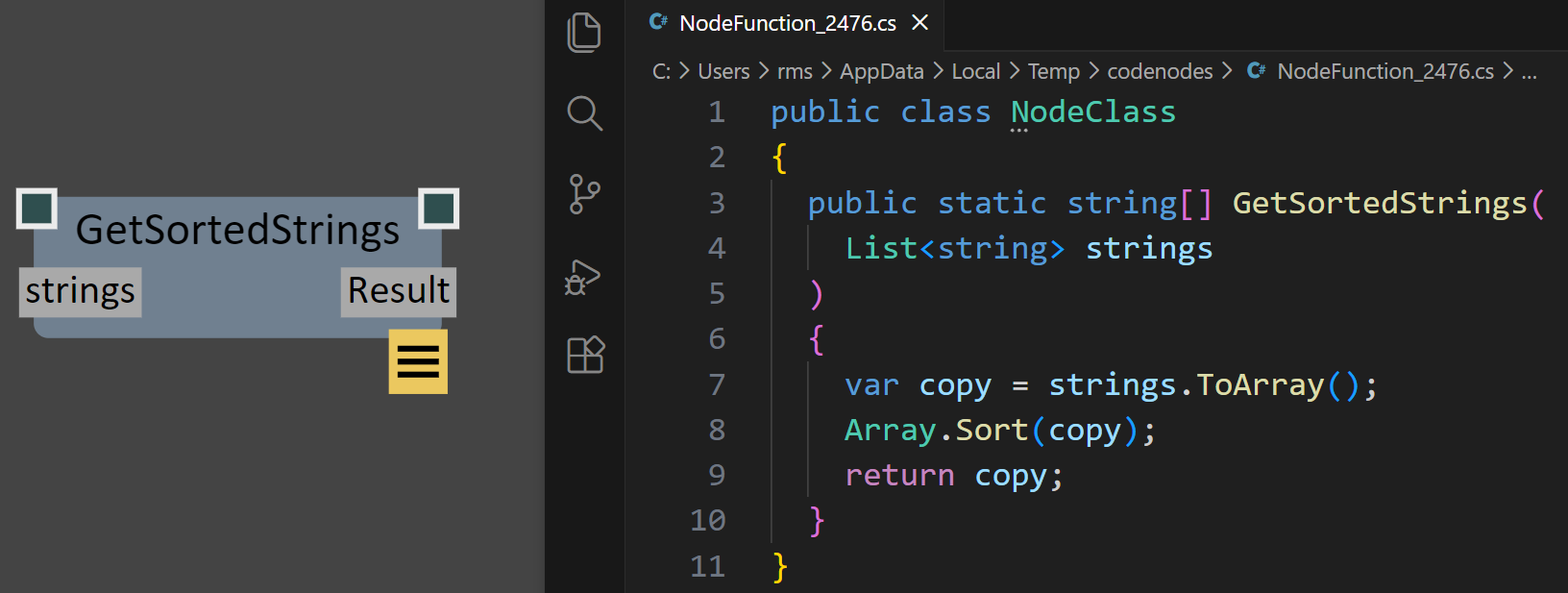
This String Sorting node is defined by C# code embedded in the graph/Node that is dynamically-compiled using the roslyn C# compiler project
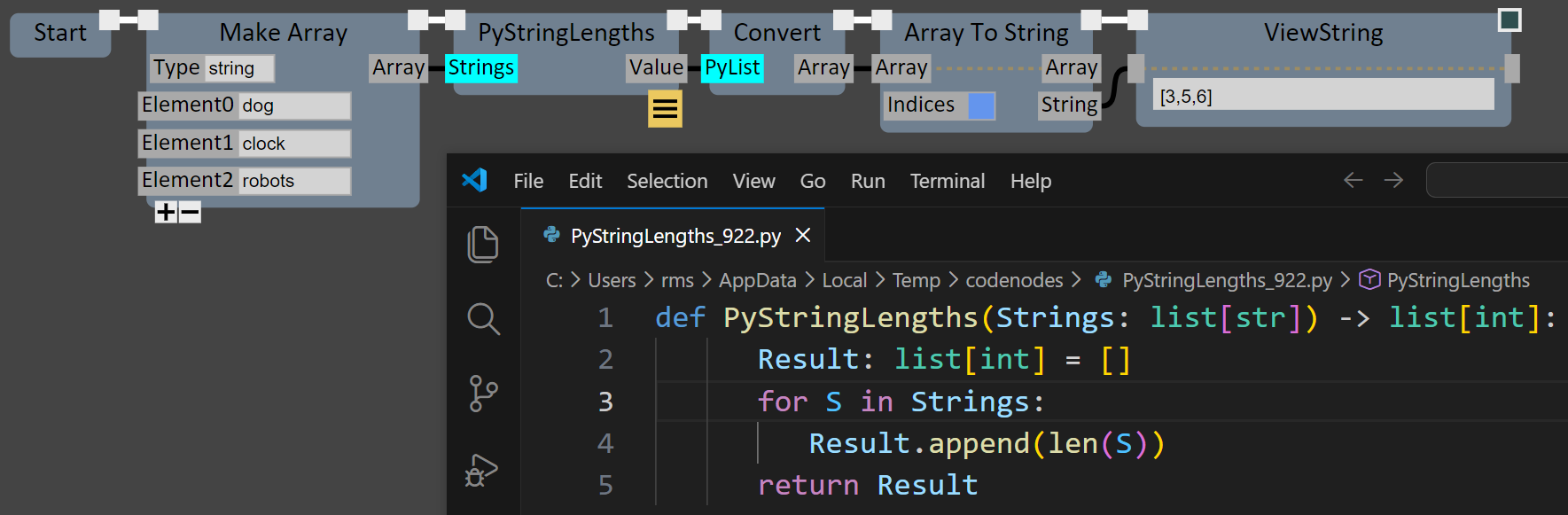
This Python code node takes a list of strings and returns a list of string-lengths. conversion between python and c# is currently supported for standard types and lists.
I’ve also included an “AI Node Wizard” that can call out to remote LLMs (currently Gemini and Claude) to auto-generate the inline code for a Node. An example is shown to right, where I ask the Robot to create a CodeNode that fetches a list of repository names from Github. It seems to do a passable job - it might not be production-quality, but it’s probably done as good a job as someone trying to copy-paste from Stack Overflow. And in the context of an end-user Tool, that’s fine. It get’s the job done, plugging a hole in the existing Node library. I’m expecting to hear some harsh words about supporting this kind of thing, but in my opinion, creating isolated Nodes is an ideal use case for LLM code generation, and I have lots of ideas I want to explore here.
If you’d rather not store the code in the graph, custom end-user Node Libraries are also already supported - this sample project on Github can get you started. The code generated by the Node Wizard can be directly copied into this project if you wanted to make a CodeNode re-usable across graphs. Or you can use your favorite AI-assisted development environment (Copilot, Claude Code, Cursor, Antigravity, etc) to iterate on your nodes. Because it’s C#, hot-recompile/reload works great!
The goal with all this is to try to help with one of the biggest pain points of NodeGraph programming, which is having to try to build complex algorithms or logic out of Nodes, when it should clearly be done with Code. Implementing a sorting algorithm by wiring Nodes is not sensible when it could be a trivial one-liner of C#. You don’t have to be an expert Software Engineer to code at that level (and now a Robot can vibe it for you). Every time I brought up NodeGraphs with a graphics or geometry programmer they would mumble something about how it seemed powerful but doing math was so horrible. Well, now you can code the math (if you prefer) and only do the interactive wiring at a level of abstraction that you find helpful.
I’ve struggled to concisely explain just exactly why I think this is such an interesting and powerful approach to Programming. Most well-known NodeGraph systems are domain or application-specific - Blueprints were intended for Gameplay Programming, Houdini focuses on complex simulations and visual effects, Substance Designer is focused on 3D object Materials, and so on. Those systems provide an end-user-programming interface to what otherwise would otherwise only be accessible via complex GUIs (inherently fixed-function) or code libraries (useless to non-text-coders). Nodes give end-users the flexibility to “build their own Tools” - to some degree. The degree is limited by the scope of the Node Library, but also how much general-purpose Programming can be exposed in the NodeGraph system. There are many technical constraints here, e.g. if the entire graph has to execute on the GPU, you can’t easily have filesystem operations in there…
I’ve also seen first-hand what skilled users can do with a general-purpose Programming NodeGraph system. When used in “Editor” mode, UE’s Blueprints support building complex GUI’s, data-processing functionality, and complex procedural content generation entirely with Nodes. This was not the intended use case of Blueprints - initially “Editor Blueprints” support was a one-person side-project (thanks Lauren!), built at the request of expert UE Tech Artists. But the result - somewhat inadvertently - became a development environment that I believe is materially different than any existing end-user Programming Tool.
Once I had seen what people can do with NodeGraph Programming, I found it really hard to go back to building the kind of pointy-clicky Interactive 3D Tools I’ve been building my entire life, like Meshmixer or UE’s Modeling Mode. The reality of building that kind of Tool is that you get an endless stream of user feature requests that are so often just permutations of your existing functionality. As the Tool Builder, you can’t possibly provide all this flexibility - the UI would become a nightmare. But you can give your users some kind of “end-user scripting”. Python is OK for this but Python is still text-programming and as a result it’s out-of-scope for the majority of users. NodeGraphs seem to hit the sweet spot of low-barrier-to-entry but still capable of complex logic, data structures, and control flow. So I decided that if I was ever going to build another Tool, it was going to have a Node Graph. And I set out to build a flexible NodeGraph environment that I hope will be applicable in nearly any end-user-programming context.
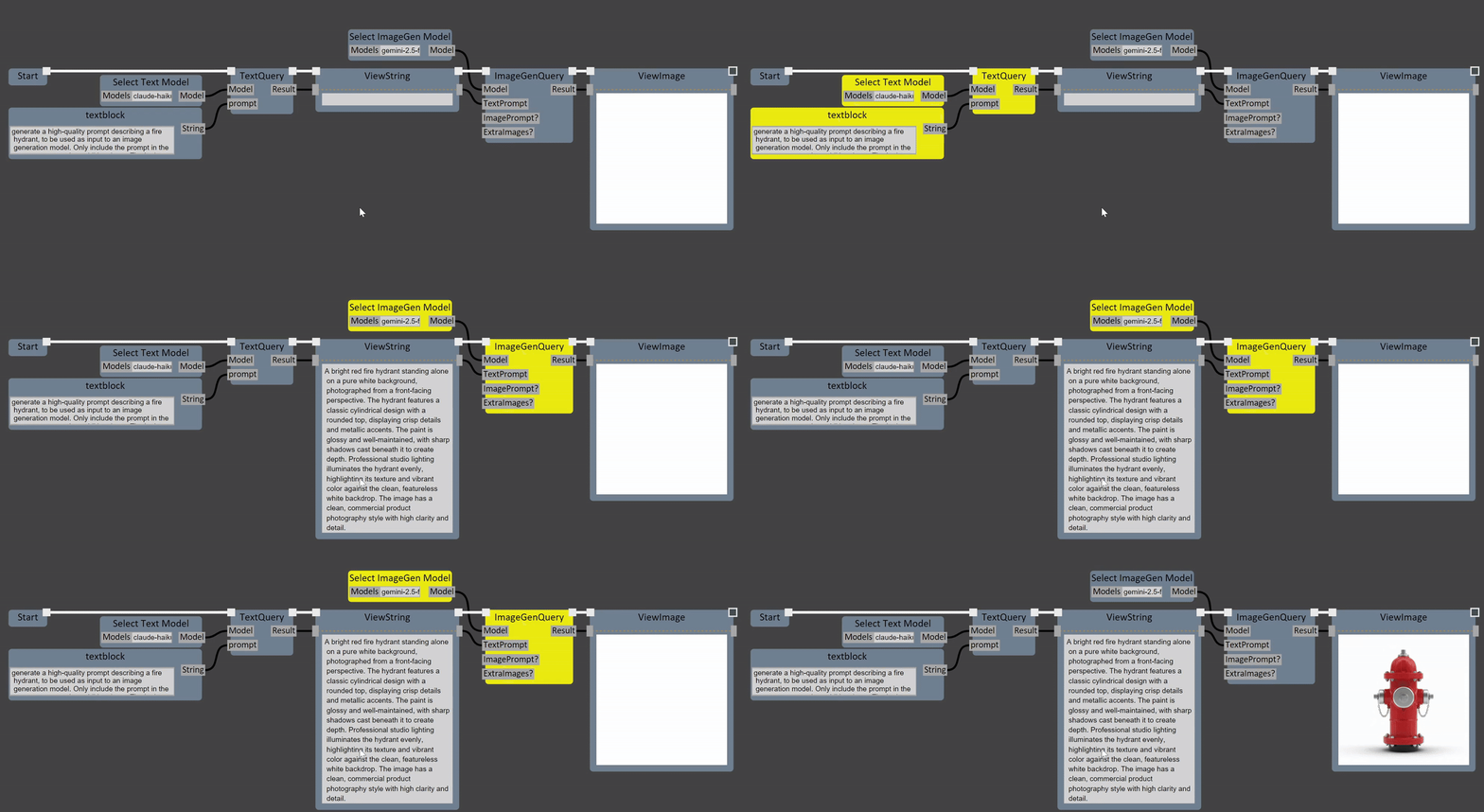
As an example of the kinds of things that become quite straightforward to accomplish once you have a suitable NodeGraph architecture, I’ve built out a few “AI Services Nodes” that can make calls to Claude and Gemini as part of the graph execution. I think of these as “magic box” nodes, like imagine if you could just sit down and write a C# function that returns the list of objects in an image…well now that is basically possible. The simple example below shows “prompt expansion” (ie asking an LLM to generate more detailed prompt text for image generation from a more basic text description) ((something which seems nonsensical but does seem to work in practice…)) and then a call to a text-to-image model (Google NanoBanana). This is essentially a really basic version of what tools like Comfy and Weavy can do - but in an environment where you also can do much more complex NodeGraph Programming.
C# is an ideal framework for building Node Graphs, which I explain a bit at the bottom of the page I linked above. The combination of static typing, deep reflection, “safe” execution with exceptions, runtime compilation, and dynamic typing, are all critical to the GSGraph infrastructure. I am skeptical that it would be possible to build as flexible of a system in any other programming language. I know C# is not not everyone’s cup of tea. But it integrates well with C/C++, has great support for hosting Python, and there is an enormous library of packages that can be leveraged to create Nodes.
I see the standalone GSGraph Editor as a kind of “sandbox” programming tool, where it should be easy to integrate many different libraries and route data between them, regardless of language, API, data formats, and so on. But I’ve also designed the core NodeGraph Engine so that it can be incorporated into other apps (a simple command-line app, GSGraphCL, is available as an open-source demo). And the Editor itself is structured for integration into other apps (the only core dependency right now is SkiaSharp, for 2D rendering). Whether I can find a way to make that Open Source too, depends on where this project goes.
There are a ton of other NodeGraph features I have implemented, and many more to come. My focus right now is on making the NodeGraph development experience more efficient and expressive, rather than actually building out huge Node libraries myself. And this is where I’m a bit nervous about releasing this project, because today it doesn’t exactly do very much, if you are looking for a set of predefined Nodes to play with. I’ve built out quite a few “Core” Nodes for Lists and Arrays, String and Scalar/Vector Math operations, interacting with the Filesystem and Environment, and running Processes. So it’s a decent shell-scripting-like environment, already. I’ve also been working on Node libraries for my geometry3Sharp mesh processing library - you can load/save OBJ and GLTF meshes, and there is even a passable USD loader. I’ve exposed a slightly arbitrary set of of Remeshing, Smoothing, AutoRepair, Transform, and related mesh-stuff nodes. And it can automatically launch Meshmixer as a mesh viewer! A lot more will be coming here. I’m also really hoping to take guidance from users on which areas to focus on!
click to see this bigger!
In the meantime, here is one “real project” I have done with GSGraph. My wife requested some 3D-printed hooks, for hanging growing tendrils of a plant off a curtain rod (shown in the images below-right). I created a graph that generates the hook procedurally. The main body of the hook is created using a union of implicit spheres placed along a Bezier path, with decreasing radius. The sampling density can be varied - for the final smooth hook I just cranked it up really high. To avoid support structures in the 3D print, the spheres are placed so that they are all resting on the “ground”, ie the hook kind of “slopes downwards” if you look at it edge-on, rather than being mirror-symmetric. Then I subtracted an implicit cylinder to create the area that rests in contact with the curtain rod. The implicit CSG tree is meshed using Marching Cubes, and then I added a Mesh Plane Cut to slightly flatten it on one side (again, a concession to 3D printing without support structures). You can see the graph on the right (click to see it zoomed in, or click here to download the graph file).
It’s a simple part, but it turned out really nice, and forced me to build out quite a few missing Nodes. I’m intending to do small projects like this on a regular basis to push things forward. And I hope you might, too! If this project sounds at all interesting, I’d love to hear from you - please drop me a line on Bluesky, or join the #gsgraph channel on the Gradientspace Discord, or send me an email!
Here’s the download link again, so you don’t have to scroll all the way back up to the top of this too-long post! http://gradientspace.com/gsgraph
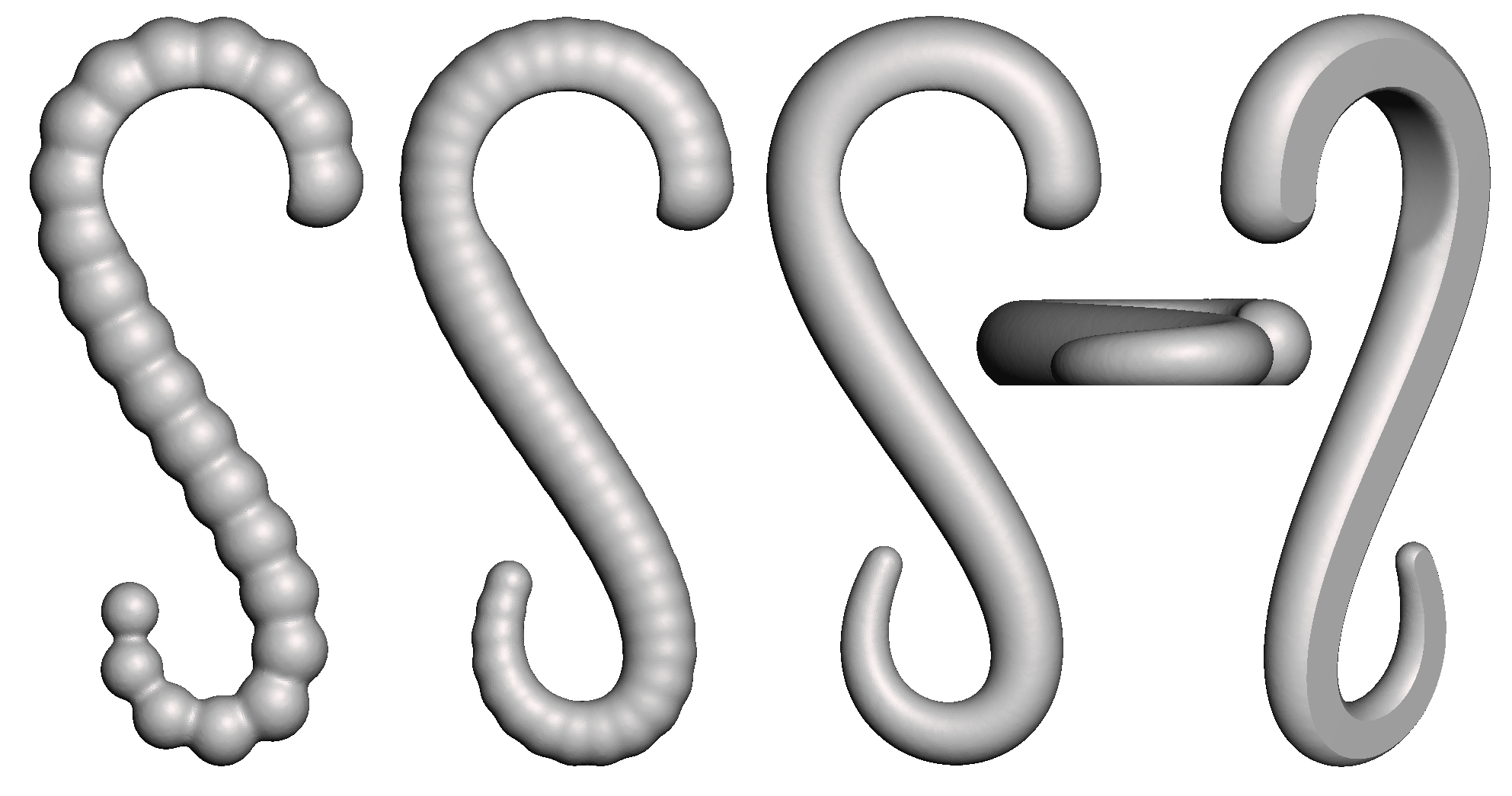
tweaking the sphere sampling rate (left), and the final result with a flat base for support-free printing (right)
The 3D-Printed hooks in action